
DrawerCart Lite is the free core plugin for DrawerCart and must be installed and activated before you can use DrawerCart Pro.
Step 1: Go to Add New Plugin
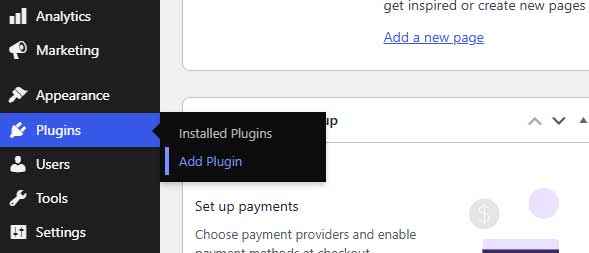
Log in to your WordPress dashboard and go to:
Plugins → Add New Plugin
Step 2: Search for DrawerCart
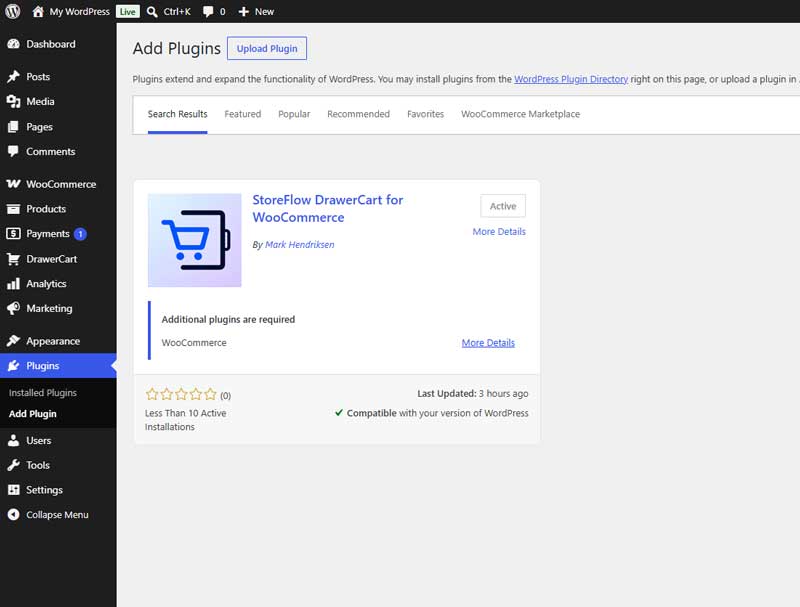
In the search field, enter:
StoreFlow DrawerCart for WooCommerce
The plugin should appear in the search results.
Step 3: Install DrawerCart Lite
Click Install Now.
WordPress will download and install DrawerCart Lite automatically.
Step 4: Activate DrawerCart Lite
After the installation is complete, click Activate.
DrawerCart Lite is now installed and active on your website.
Step 5: Continue with DrawerCart Pro
If you purchased DrawerCart Pro, keep DrawerCart Lite installed and activated.
DrawerCart Pro works as an add-on to DrawerCart Lite and unlocks the premium features.