
WooCommerce drawer cart plugin

Drawer Cart Documentation

Getting started

3
  • 5
    Overview
  • 5
    Installing Drawer Cart Lite
  • 5
    Installing Drawer Cart Pro
  • 5
    Activating License Key

General settings

3
  • 5
    Overview
  • 5
    Presets
  • 5
    Drawer
  • 5
    Header
  • 5
    Empty cart
  • 5
    Menu trigger
  • 5
    Visibility
  • 5
    Advanced

Floating cart

3
  • 5
    Behavior
  • 5
    Design

Product cards

3
  • 5
    Content
  • 5
    Layout
  • 5
    Design

Rewards

3
  • 5
    Setup
  • 5
    Milestones
  • 5
    Design

Recommended products

3
  • 5
    Products
  • 5
    Layout
  • 5
    Design
  • 5
    Mobile

Coupons

3
  • 5
    Behavior
  • 5
    Toggle
  • 5
    Coupon form

Cart notice

3
  • 5
    Content
  • 5
    Layout
  • 5
    Design

Summary & checkout

3
  • 5
    Summary
  • 5
    Actions
  • 5
    Footer

Express checkout

3
  • 5
    Express checkout
  • 5
    Layout
  • 5
    Divider

Payment badges

3
  • 5
    Icons
  • 5
    Layout
  • 5
    Design
  • 5
    Mobile

Labels & messages

3
  • 5
    Labels & messages

Presets

Navigate to Drawer Cart → General → Presets in your WordPress dashboard.

Browse the available designs and click Apply preset below the preset you want to use. The Live Preview will update so you can see how the selected design looks before saving it.

After applying a preset, you can customize every setting individually from the other sections of the plugin.
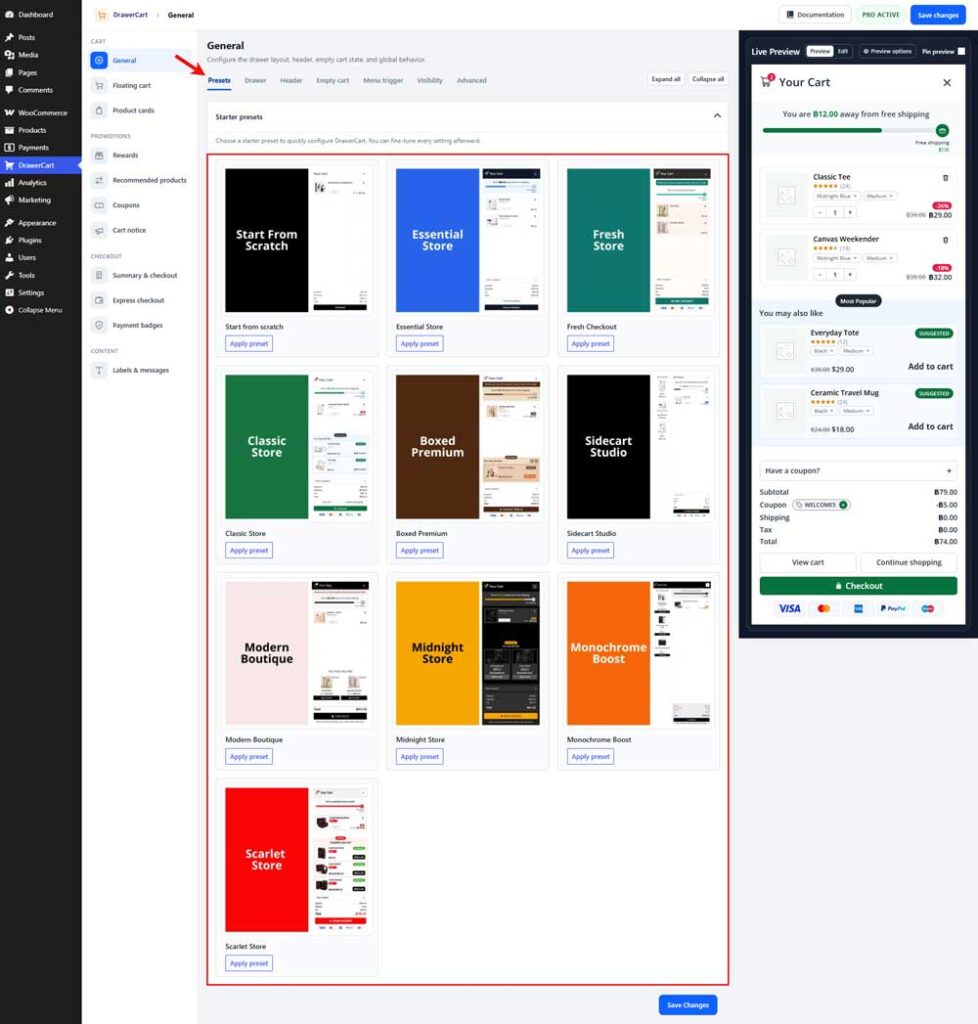
Table of Contents