WooCommerce drawer cart plugin

Drawer Cart Documentation

Getting started

3
  • 5
    Overview
  • 5
    Installing Drawer Cart Lite
  • 5
    Installing Drawer Cart Pro
  • 5
    Activating License Key

General settings

3
  • 5
    Overview
  • 5
    Presets
  • 5
    Drawer
  • 5
    Header
  • 5
    Empty cart
  • 5
    Menu trigger
  • 5
    Visibility
  • 5
    Advanced

Floating cart

3
  • 5
    Behavior
  • 5
    Design

Product cards

3
  • 5
    Content
  • 5
    Layout
  • 5
    Design

Rewards

3
  • 5
    Setup
  • 5
    Milestones
  • 5
    Design

Recommended products

3
  • 5
    Products
  • 5
    Layout
  • 5
    Design
  • 5
    Mobile

Coupons

3
  • 5
    Behavior
  • 5
    Toggle
  • 5
    Coupon form

Cart notice

3
  • 5
    Content
  • 5
    Layout
  • 5
    Design

Summary & checkout

3
  • 5
    Summary
  • 5
    Actions
  • 5
    Footer

Express checkout

3
  • 5
    Express checkout
  • 5
    Layout
  • 5
    Divider

Payment badges

3
  • 5
    Icons
  • 5
    Layout
  • 5
    Design
  • 5
    Mobile

Labels & messages

3
  • 5
    Labels & messages

Toggle

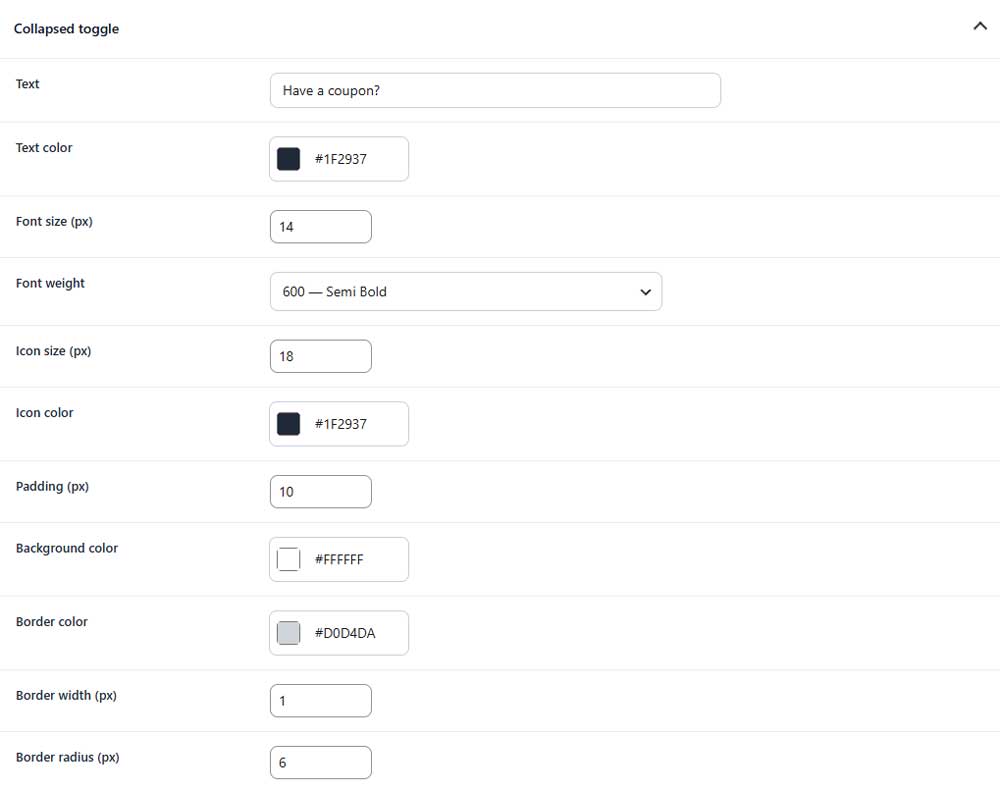
Customize the collapsed coupon toggle shown before the coupon form is opened.

coupon toggle tab

Collapsed toggle

coupon collapsed toggle

Text
Sets the text displayed in the coupon toggle.

Text color
Sets the color of the toggle text.

Font size
Sets the font size of the toggle text.

Font weight
Controls how light or bold the toggle text appears.

Icon size
Sets the size of the toggle icon.

Icon color
Sets the color of the toggle icon.

Padding
Sets the inner spacing of the coupon toggle.

Background color
Sets the background color of the toggle.

Border color
Sets the color of the toggle border.

Border width
Sets the thickness of the toggle border.

Border radius
Controls how rounded the toggle corners appear.

Table of Contents