
WooCommerce drawer cart plugin

Drawer Cart Documentation

Getting started

3
  • 5
    Overview
  • 5
    Installing Drawer Cart Lite
  • 5
    Installing Drawer Cart Pro
  • 5
    Activating License Key

General settings

3
  • 5
    Overview
  • 5
    Presets
  • 5
    Drawer
  • 5
    Header
  • 5
    Empty cart
  • 5
    Menu trigger
  • 5
    Visibility
  • 5
    Advanced

Floating cart

3
  • 5
    Behavior
  • 5
    Design

Product cards

3
  • 5
    Content
  • 5
    Layout
  • 5
    Design

Rewards

3
  • 5
    Setup
  • 5
    Milestones
  • 5
    Design

Recommended products

3
  • 5
    Products
  • 5
    Layout
  • 5
    Design
  • 5
    Mobile

Coupons

3
  • 5
    Behavior
  • 5
    Toggle
  • 5
    Coupon form

Cart notice

3
  • 5
    Content
  • 5
    Layout
  • 5
    Design

Summary & checkout

3
  • 5
    Summary
  • 5
    Actions
  • 5
    Footer

Express checkout

3
  • 5
    Express checkout
  • 5
    Layout
  • 5
    Divider

Payment badges

3
  • 5
    Icons
  • 5
    Layout
  • 5
    Design
  • 5
    Mobile

Labels & messages

3
  • 5
    Labels & messages

Content

Display a text message or countdown at the top of the cart drawer.

cart notice content tab

Visibility

cart notice visibility

Enable cart notice
Shows or hides the cart notice inside the drawer.

Hide notice bar when cart is empty
Hides the cart notice when the customer’s cart has no items.

Notice content
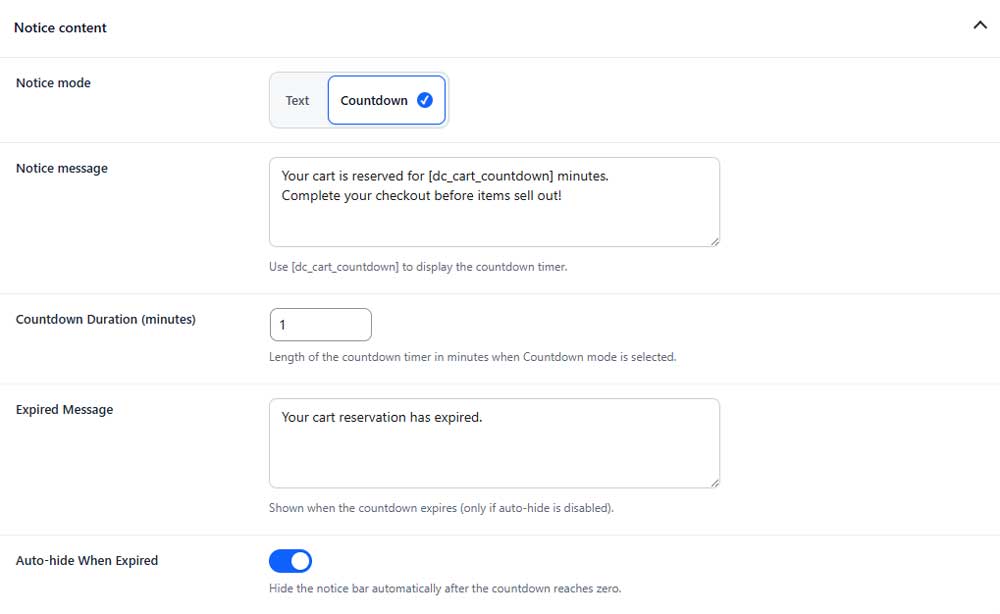
cart notice content

Notice mode (PRO)
Choose whether the notice displays a standard message or a countdown timer.

Notice message
Sets the message displayed in the notice bar. Use [dc_cart_countdown] to show the countdown timer.

Countdown duration
Sets how many minutes the countdown timer runs.

Expired message
Sets the message displayed after the countdown reaches zero.

Auto-hide when expired
Automatically hides the notice bar when the countdown expires.

Table of Contents
