WooCommerce drawer cart plugin

Drawer Cart Documentation

Getting started

3
  • 5
    Overview
  • 5
    Installing Drawer Cart Lite
  • 5
    Installing Drawer Cart Pro
  • 5
    Activating License Key

General settings

3
  • 5
    Overview
  • 5
    Presets
  • 5
    Drawer
  • 5
    Header
  • 5
    Empty cart
  • 5
    Menu trigger
  • 5
    Visibility
  • 5
    Advanced

Floating cart

3
  • 5
    Behavior
  • 5
    Design

Product cards

3
  • 5
    Content
  • 5
    Layout
  • 5
    Design

Rewards

3
  • 5
    Setup
  • 5
    Milestones
  • 5
    Design

Recommended products

3
  • 5
    Products
  • 5
    Layout
  • 5
    Design
  • 5
    Mobile

Coupons

3
  • 5
    Behavior
  • 5
    Toggle
  • 5
    Coupon form

Cart notice

3
  • 5
    Content
  • 5
    Layout
  • 5
    Design

Summary & checkout

3
  • 5
    Summary
  • 5
    Actions
  • 5
    Footer

Express checkout

3
  • 5
    Express checkout
  • 5
    Layout
  • 5
    Divider

Payment badges

3
  • 5
    Icons
  • 5
    Layout
  • 5
    Design
  • 5
    Mobile

Labels & messages

3
  • 5
    Labels & messages

Layout

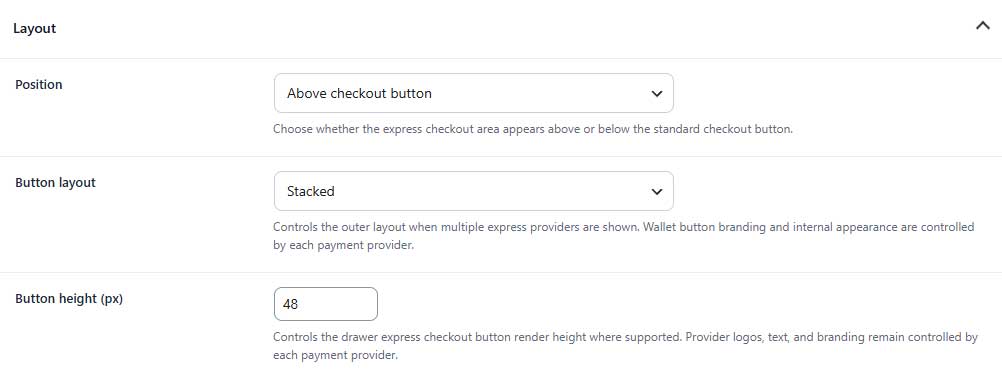
Control the position, arrangement, and height of the express checkout buttons.

Express layout tab

Layout (PRO)

Express layout

Position
Choose whether the express checkout area appears above or below the standard checkout button.

Button layout
Choose whether multiple express checkout buttons are displayed side by side or stacked.

Button height
Sets the height of supported express checkout buttons. Button branding and internal styling remain controlled by the payment provider.

Table of Contents