🎉 Black Friday Sale · 50% Off DrawerCart Pro

GET 50% OFF

WooCommerce drawer cart plugin

Drawer Cart Documentation

Getting started

3
  • 5
    Overview
  • 5
    Installing Drawer Cart Lite
  • 5
    Installing Drawer Cart Pro
  • 5
    Activating License Key

General settings

3
  • 5
    Overview
  • 5
    Presets
  • 5
    Drawer
  • 5
    Header
  • 5
    Empty cart
  • 5
    Menu trigger
  • 5
    Visibility
  • 5
    Advanced

Floating cart

3
  • 5
    Overview
  • 5
    Behavior
  • 5
    Design

Product cards

3
  • 5
    Overview
  • 5
    Content
  • 5
    Layout
  • 5
    Design

Rewards

3
  • 5
    Overview
  • 5
    Setup
  • 5
    Milestones
  • 5
    Design

Recommended products

3
  • 5
    Overview
  • 5
    Products
  • 5
    Layout
  • 5
    Design
  • 5
    Mobile

Coupons

3
  • 5
    Overview
  • 5
    Behavior
  • 5
    Toggle
  • 5
    Coupon form

Cart notice

3
  • 5
    Overview
  • 5
    Content
  • 5
    Layout
  • 5
    Design

Summary & checkout

3
  • 5
    Overview
  • 5
    Summary
  • 5
    Actions
  • 5
    Footer

Express checkout

3
  • 5
    Overview
  • 5
    Express checkout
  • 5
    Layout
  • 5
    Divider

Payment badges

3
  • 5
    Overview
  • 5
    Icons
  • 5
    Layout
  • 5
    Design
  • 5
    Mobile

Labels & messages

3
  • 5
    Labels & messages

Express checkout

Enable supported wallet buttons and control how Stripe express checkout appears on product pages.

Compatibility: Express checkout only works with WooCommerce PayPal Payments, WooCommerce Stripe Gateway, and WooPayments.

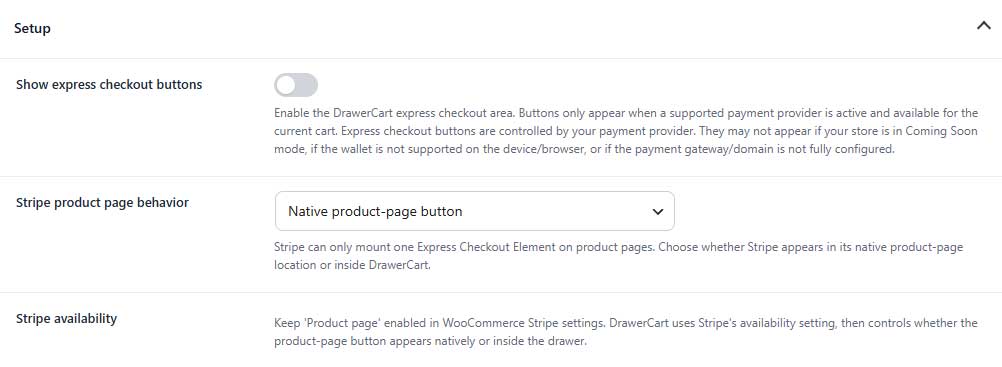
express checkout setup tab

Setup (PRO)

express checkout setup

Show express checkout buttons
Shows supported express checkout options, such as Apple Pay, Google Pay, Link, and PayPal, when available.

Stripe product page behavior
Choose whether Stripe’s express checkout button appears in its normal product-page location or inside DrawerCart.

Stripe availability
Keep Product page enabled in the WooCommerce Stripe settings. DrawerCart uses Stripe’s availability settings to determine when the button can appear.

Table of Contents