
WooCommerce drawer cart plugin

Drawer Cart Documentation

Getting started

3
  • 5
    Overview
  • 5
    Installing Drawer Cart Lite
  • 5
    Installing Drawer Cart Pro
  • 5
    Activating License Key

General settings

3
  • 5
    Overview
  • 5
    Presets
  • 5
    Drawer
  • 5
    Header
  • 5
    Empty cart
  • 5
    Menu trigger
  • 5
    Visibility
  • 5
    Advanced

Floating cart

3
  • 5
    Overview
  • 5
    Behavior
  • 5
    Design

Product cards

3
  • 5
    Overview
  • 5
    Content
  • 5
    Layout
  • 5
    Design

Rewards

3
  • 5
    Overview
  • 5
    Setup
  • 5
    Milestones
  • 5
    Design

Recommended products

3
  • 5
    Overview
  • 5
    Products
  • 5
    Layout
  • 5
    Design
  • 5
    Mobile

Coupons

3
  • 5
    Overview
  • 5
    Behavior
  • 5
    Toggle
  • 5
    Coupon form

Cart notice

3
  • 5
    Overview
  • 5
    Content
  • 5
    Layout
  • 5
    Design

Summary & checkout

3
  • 5
    Overview
  • 5
    Summary
  • 5
    Actions
  • 5
    Footer

Express checkout

3
  • 5
    Overview
  • 5
    Express checkout
  • 5
    Layout
  • 5
    Divider

Payment badges

3
  • 5
    Overview
  • 5
    Icons
  • 5
    Layout
  • 5
    Design
  • 5
    Mobile

Labels & messages

3
  • 5
    Labels & messages

Installing Drawer Cart Pro

DrawerCart Pro is the premium add-on for DrawerCart and unlocks the advanced features of the plugin.

Before installing DrawerCart Pro, make sure DrawerCart Lite is already installed and activated.

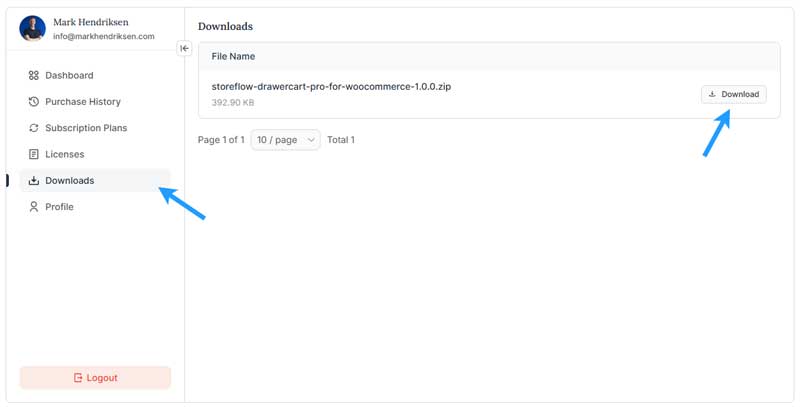
Step 1: Download DrawerCart Pro

Log in to your WP StoreFlow account and download the DrawerCart Pro .zip file.

Keep the file zipped — you do not need to extract it.
Step 2: Go to Add New Plugin

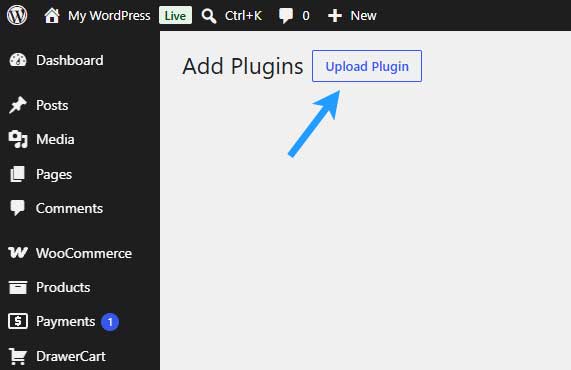
In your WordPress dashboard, go to:

Plugins → Add New Plugin

Then click Upload Plugin at the top of the page.
Step 3: Upload DrawerCart Pro

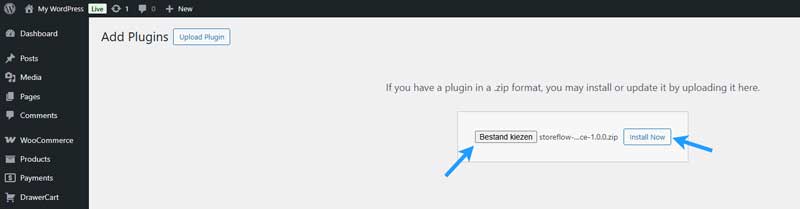
Click Choose File and select the DrawerCart Pro .zip file you downloaded.

Then click Install Now.

WordPress will upload and install the plugin.
Step 4: Activate DrawerCart Pro

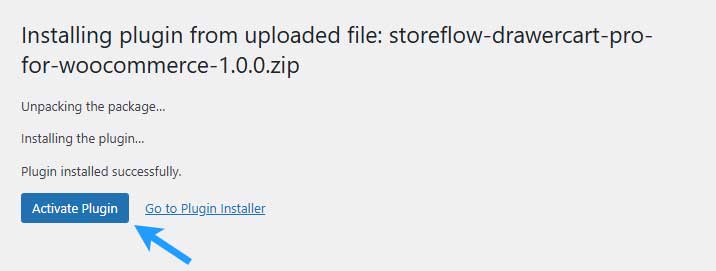
Once the installation is complete, click Activate Plugin.

DrawerCart Pro is now installed and active on your website.
Step 5: Keep DrawerCart Lite Active

DrawerCart Pro works as an add-on to DrawerCart Lite.

Make sure both of these plugins remain installed and activated:

WP StoreFlow DrawerCart for WooCommerce
WP StoreFlow DrawerCart Pro for WooCommerce

DrawerCart Pro is now installed and activated.

The final step is to activate your license key so you can receive updates and use your Pro license.

Next: Activate Your License Key

Table of Contents